Instruction Sheets for Part Number KWD-MC-100W
Technical Articles for Part Number KWD-MC-100W
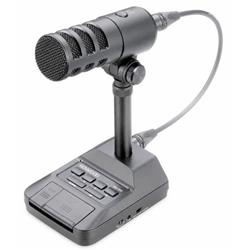
Kenwood MC-100W Desktop Microphones
Microphone, Desktop, For TS-990S/TS-890S, 600-Ohms Impedance, Frequency Range 50-10,000Hz, PTT/Lock Buttons, 8-Pin Mic Cable, Each
See More Specifications
Estimated Ship Date: Monday 11/16/2026 Would you rather pick it up?
Overview
The Kenwood MC-100W desktop microphone is a premium communications microphone designed for Amateur Radio operators who demand exceptional audio quality, operating flexibility, and convenient desktop control. Featuring two selectable dynamic microphone elements, the MC-100W allows users to switch between unidirectional and omnidirectional pickup patterns to optimize performance for virtually any operating environment.
In unidirectional mode, the microphone focuses on audio directly in front of the element, helping reduce background noise and improve voice intelligibility during contesting, DX operation, and noisy shack environments. Omnidirectional mode provides broader audio pickup and more consistent coverage, making it ideal for casual operating and situations where greater freedom of movement is desired.
Engineered specifically for communications use, the MC-100W delivers a rich, full-bodied sound with enhanced low-frequency response while maintaining clear and natural voice reproduction. Additional features include programmable function keys, UP/DOWN frequency controls, a low-cut filter, microphone gain adjustment, USB audio output for PC connectivity, and compatibility with select Kenwood, Icom, and Alinco transceivers.
For added versatility, the microphone can be detached from the included desktop stand and mounted to a standard microphone boom or stand, allowing operators to tailor their station setup to their preferred operating style.
Included Accessories:
XLR cable (microphone to microphone stand)
8-pin Mic Cable (microphone stand to transceiver)
Adjustment Screwdriver
Cap (for microphone stand opening)
Kenwood MC-100W Controls, Functions, and Connectors:
The MC-100W microphone contains two built-in microphone elements:
Unidirectional
Omnidirectional
Each has different pickup patterns and frequency-response characteristics. Refer to the Polar Pattern/Frequency Response chart for details.
Microphone Element Switch: Pressing this switch toggles between the unidirectional and omnidirectional microphone elements.
Omnidirectional (Press In)
Picks up sound equally from all directions.
Frequency response does not change significantly when speaking very close to the microphone.
Recommended for close-talk operation, DX communications, pileups, or situations where maximum talk power and long-distance signal transmission are desired.
- Unidirectional (Release)
Primarily picks up sound from the front of the microphone.
Rejects sound from the sides and rear.
Intended for normal conversations and everyday operation.
Produces enhanced low-frequency response (proximity effect) when spoken into at close range.
- PF (Programmable Function) Keys 1-4
The PF keys can be assigned to various transceiver functions.
By assigning frequently used functions or menu items, you can activate those functions simply by pressing the corresponding PF key.
For assignment procedures and available functions, refer to your transceiver's instruction manual.
- UP/DOWN Keys
Used to increase or decrease values in the following operating modes. Holding the key down enables continuous scrolling.
The UP/DOWN keys may also be configured as PF keys.
Functions include:
VFO Mode: Increase/decrease VFO frequency
Memory Channel Mode: Increase/decrease memory channel number
Memory Scroll Mode: Increase/decrease memory scroll number
Microphone Paddle Mode: Paddle input (dots and dashes)
Menu Mode: Displays previous or next menu selection
PTT Lock Key (LOCK)
Pressing this key locks the microphone in the transmit condition.
Press it again to release the lock and return the transceiver to receive mode.
PTT (Push-To-Talk) Switch
While the PTT switch is held down, the transceiver remains in transmit mode.
Releasing the switch returns the transceiver to receive mode.
-Low-Cut Switch
Turns the low-frequency filter on or off.
When enabled, low-frequency components of the audio signal are reduced.
- Microphone Gain Control: Adjusts the microphone output level.
Turn clockwise to increase output level.
Turn counterclockwise to decrease output level.
Use this control if the microphone output is too low for your transceiver.
Excessive clockwise adjustment may cause overmodulation and distorted audio. Always use the supplied adjustment screwdriver when making gain adjustments.
- Manufacturer Selection Switch: Set this switch to match the manufacturer of the transceiver connected to the MC-100W.
Supported positions include:
ICOM
KENWOOD
ALINCO
Important!
Always turn off the transceiver before changing switch positions.
If the switch position does not match the connected radio manufacturer, both the microphone and transceiver may not operate properly.
- Microphone Output Connector: Connects to the microphone input (MIC IN) on the stand using the supplied XLR cable.
- Microphone Input Connector (MIC IN): Connects to the microphone output connector using the supplied XLR cable.
- Transceiver Connector (TO TRX): Connects the microphone stand to the transceiver using the supplied 8-pin metal cable.
- Foot Switch Jack
6.3 mm (1/4-inch) PTT SW jack: Allows hands-free operation using an external foot switch. The foot switch simply closes the PTT line to ground:
Note: Users building their own foot switch should follow the wiring diagram in the manual.
- USB Audio Output
USB Type-C™ (AUDIO OUT):
Connect to a PC using a standard USB cable.
USB Features:
Outputs microphone audio directly to a computer.
Supports USB Audio Class 2.0.
Tested on Windows 11.
USB Notes:
PTT, PF keys, and other switch functions are not recognized by the PC through the USB connection.
Only audio is passed to the computer.
- Angle Adjustment Knobs
Loosen the knobs on both sides by turning them counterclockwise.
This allows the microphone angle to be adjusted.
After adjustment, tighten the knobs clockwise to secure the microphone in position.
- Adjustment Ring: Viewed from above:
Turn counterclockwise to remove the microphone from the stand.
Turn clockwise to secure the microphone to the stand.
Keep the ring tightened except when intentionally removing the microphone.
- Remove Button : Press this button before disconnecting the XLR cable. Verify connector orientation before reconnecting the cable.
Additional Features & Specifications:
Dimensions (W x H x D): 4.33 x 8.9 x 5.47 in. (110 x 226 x 139mm)
Weight: Approx 2.2 lbs. (1kg)
Impedance: 600 Ohms
Frequency Range: 50 – 10,000 Hz
Signal-to-noise Ratio: 60 dB or more
Power Supply: 5 to 8 VDC (supplied from the transceiver) & 5 VDC (supplied from USB)
Sensitivity: -40 dB (VR Max.)
Mic Elements: Dynamic Type, Cardioid and Omnidirectional
Temperature: Operating +14°F - +140°F (-10°C - +60°C) Storage -4°F - +140°F (-20°C - +60°C)
Specifications
Documentation
Instruction Sheets for Part Number KWD-MC-100W
Technical Articles for Part Number KWD-MC-100W
Reviews Write a Review
Some parts are not legal for use in California or other states with similar laws / regulations
Modal Header
Call To Order
This is a custom order part. You can order this part by Contacting Us.
