Instruction Sheets for Part Number RIG-RIGSELECTPRO
Technical Articles for Part Number RIG-RIGSELECTPRO
Part Number: RIG-RIGSELECTPRO
RigSelect Pro Transceiver Switch and SO2R Controllers
Station Switch, SO2R, Four Radio, TFT Display, Mic/Headphones/CW Keyer/PTT, Manual or SW Control, USB C, WinKeyer3, 3.5mm Jacks, Req. 6-15VDC, Each
See More Specifications
Estimated Ship Date: Today Would you rather pick it up?
Overview
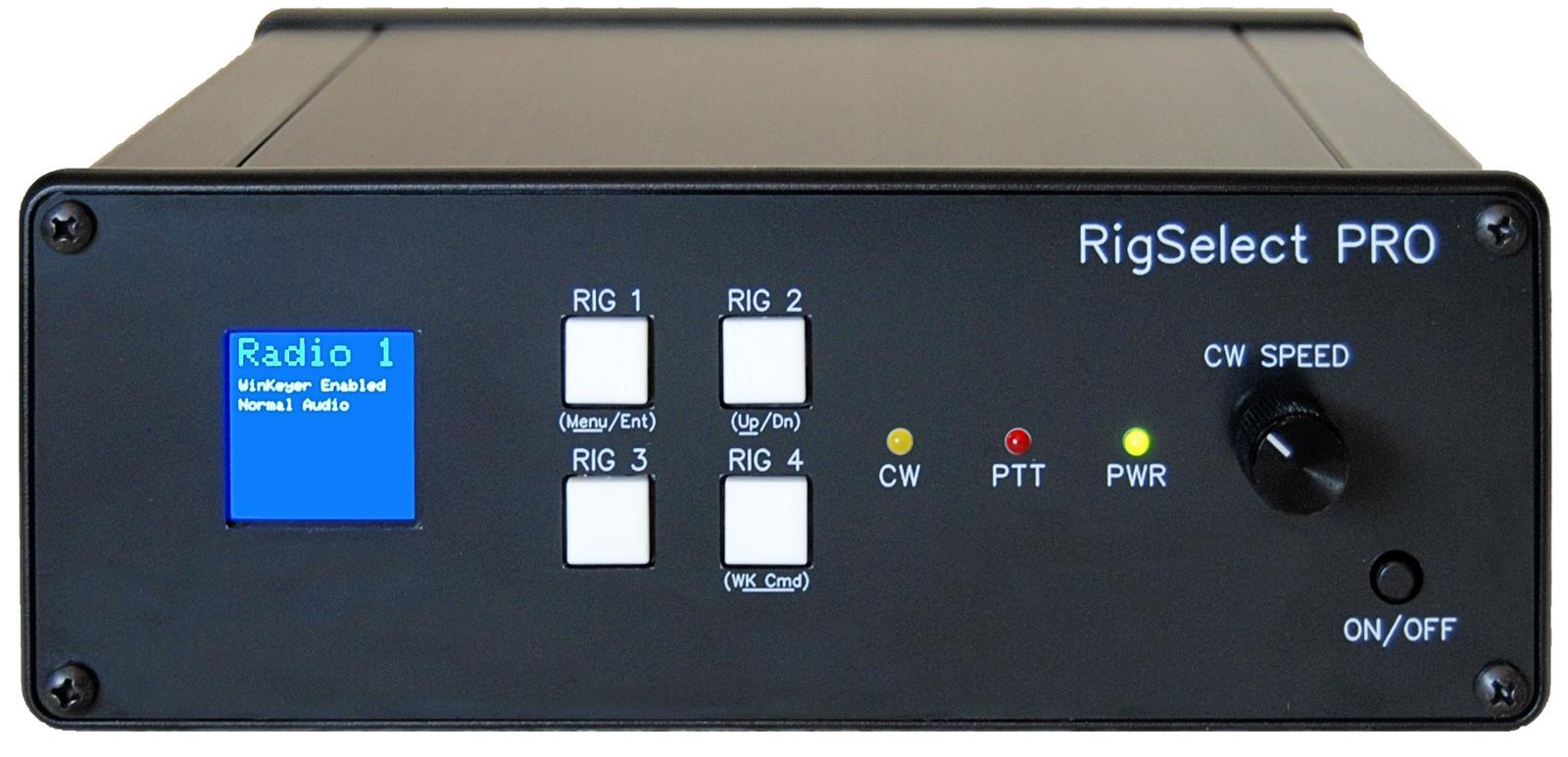
RigSelect Pro Transceiver Switch and SO2R Controllers boast an extensive array of capabilities that make it possible to implement an award-winning SO2R station, where any two of up to four connected radios can be selected as the SO2R pair—in any order. One set of headphones, microphone, paddle/key, and PTT line can be switched among any of the four radios. RigSelect uses quiet solid-state relays for all audio switching, enabling extremely fast transitions, while telecom-quality relays are used for all Mic, Key, and PTT circuits. Additionally, the RigSelect Pro features a crisp color TFT display for status and menu operations. Switching latency is extremely low, with TX switching occurring in under 2 milliseconds, ensuring seamless operation during contests. The unit operates on +6 to +15VDC at 300mA typical, 350mA max. RigSelect Pro is designed, assembled, and tested in San Diego, California, USA by KD6X Designs.
For the SO2R contest operator, RigSelect Pro supports OTRSP (Open Two Radio Switching Protocol) directly. Multiple configurations of SO2R audio management are available depending on operator preferences, as detailed below. Key, microphone, and PTT can be quickly switched between any two of up to four connected radios under control of a logging program using the OTRSP protocol. RigSelect Pro also supports SO2R+ capabilities via its Override system, allowing multiple receivers to be routed to the same headphone earpiece for advanced monitoring setups. The unit includes a genuine K1EL WinKeyer 3 CW chip, offering precise CW timing and full WinKeyer functionality.
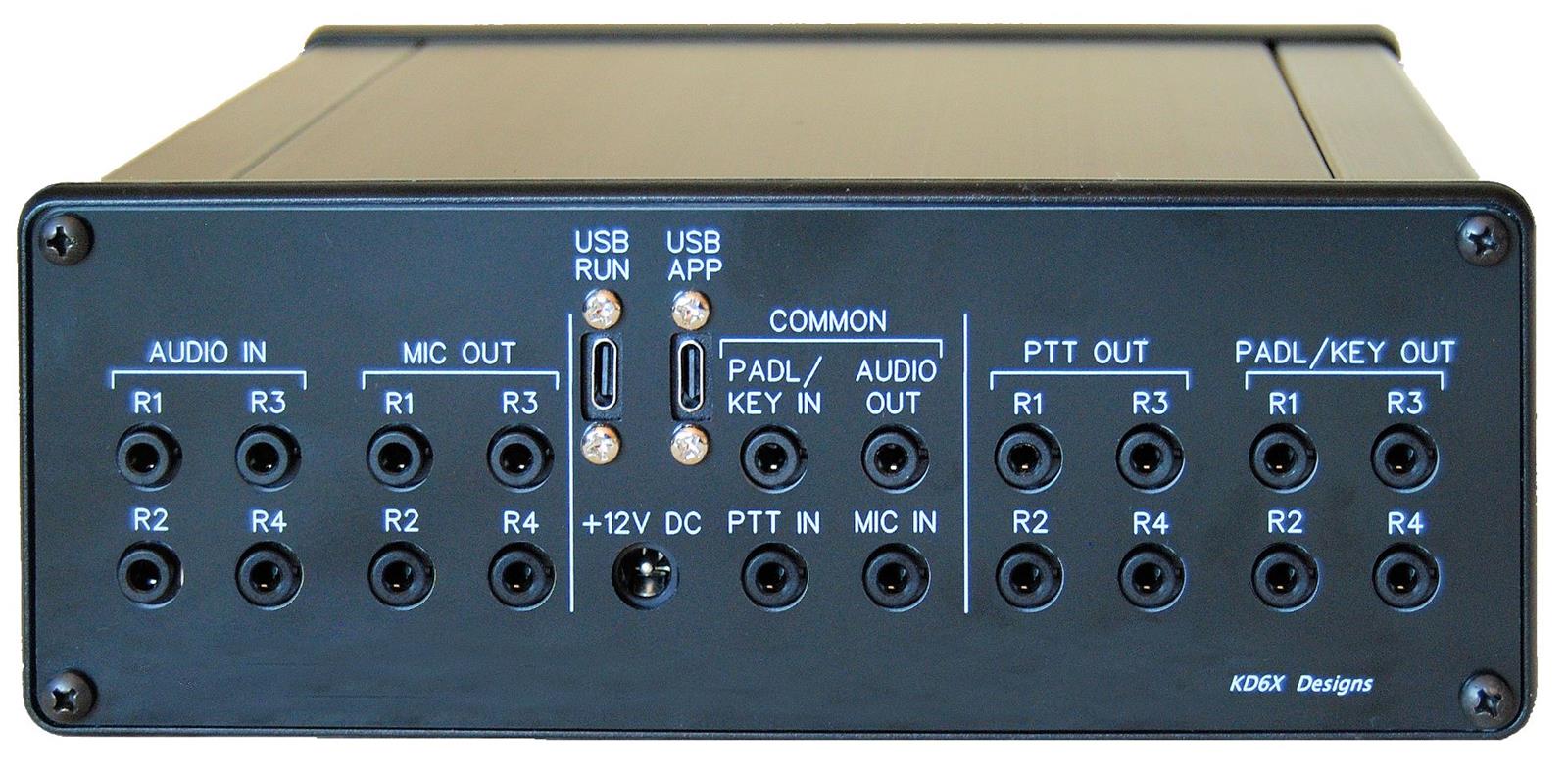
There are three logical serial ports available for computer control of RigSelect Pro via two physical USB-C connectors. On the RUN USB connector, one port is for CW commands to the built-in genuine K1EL WinKeyer 3 CW chip. A second port connects a logging program to RigSelect Pro using OTRSP to make lightning-fast computer-controlled transitions between radios. Because of these two ports on the RigSelect Pro, an interface program is not required on a PC. Connection can be made directly between most logging programs and the two CW/OTRSP ports.
A third port on the APP USB connector is available for the RigSelect Application for Microsoft Windows. This allows the operator direct control of RigSelect Pro via a Windows interface for quick adjustment of options and settings without using the front panel menu system. The App also includes additional testing and configuration options, including the ability to program WinKeyer default settings. Using the App, it is also possible to reprogram the RigSelect Pro’s front panel buttons with different commands or macros. RigSelect Pro listens to both Keyer and OTRSP commands on separate ports simultaneously. The App connects to a third, separate COM port and does not interfere with station operation. The RigSelect App includes diagnostic tools, firmware update utilities, and jumper configuration guidance. Firmware updates and release notes are available for free via the RigSelect Downloads page.
RigSelect Pro also supports a powerful computer control capability via an internal command set which is available on the APP connector. In addition to all the OTRSP commands, there are 65 different RigSelect commands available. These can be combined in a macro for use either within the App or assigned to a front panel pushbutton. In addition to the above features and the OTRSP protocol, RigSelect implements the audio switching capabilities popularized in the YCCC (Yankee Clipper Contest Club) SO2R Box as listed below with notable improvements.
SO2R Audio Options:
Blank TX on XMIT - This is an SO2R option to blank the audio from the radio that is transmitting a computer-generated message. Many SO2R operators want to use transmit message time to focus on the non-transmitting receiver. Blanking the transmitting radio may help improve concentration. Any manual key/paddle activity will immediately suspend blanking and restore the transmitting audio.
Blank with Blend - Blend is also available in the Blank TX on XMIT option. This allows a lower volume audio signal from the transmitting radio to still be heard in that radio’s earpiece. The volume level of the Blend can be set using the “Blend Volume” setting.
Split Latch Option – This is an SO2R option where both earpieces are switched to the tip (left) main receiver channel of the receiving radio while the other radio is transmitting under computer control. Once transmit is concluded, the headphones will be returned to the radios they were connected to prior to transmit. Any manual key/paddle activity will immediately suspend this command and restore the transmitting audio.
Split-Stereo - In Split Stereo option, both earpieces are switched to the receiving radio stereo outputs during transmit. Once transmit is concluded, the headphones will be returned to the radios they were connected to prior to transmit. Like the previous options, any activity on the key or paddle suspends the switch and reverts to normal audio on both receivers.
Standard SO2R – This is not a specific option but is the result of not selecting any of the other transmit radio audio switching options. This is also the factory default. In other words, “Standard SO2R” is what you get when Split-Latch, Split-Stereo, and Blank-on-TX are all turned off. In this case, nothing happens to headset audio when transmit is occurring. You continue to hear the transmitting radio in its assigned earpiece. This will usually be a side tone or monitor signal.
Audio Modes - In addition to the audio options during transmission, RigSelect Pro implements three different audio modes. These are "NORMAL", "SPATIAL", and "SYMMETRIC". These follow the YCCC SO2R Box convention and are described in the RigSelect manual. Most users will choose "NORMAL", but options are available for special purposes.
RigSelect Pro Features at-a-Glance
Switch one set of headphones, microphone, paddle/key, and PTT line among any of four radios.
RigSelect Pro features a crisp color TFT display for status and menu operation.
SO2R capability (Single Operator 2 Radios) on any two of the four radios. For example, listen to Rig 1 on left earpiece, Rig 3 on right earpiece.
Support for the OTRSP (Open Two Radio Switching Protocol) standard.
Two separate USB ports:
USB RUN provides two standard FTDI USB 2.0 virtual serial ports for WinKeyer control and OTRSP control.
USB APP provides a CH340 virtual serial port for the optional RigSelect Windows App, which allows configuration via a PC instead of the front panel menu. Firmware updates are also implemented on this port.
Headphone circuits are isolated by audio transformers with separate ground by default. The audio ground can optionally be connected to chassis ground via a jumper on the main board.
Microphone circuit switches both mic signal and ground using telecom-quality relays. The independent ground prevents ground loops and RFI. RigSelect acts like a switching mic extension cable. There is no DC block.
A genuine WinKeyer 3.1 chip is included, which can be independently enabled or bypassed for different radios. When WinKeyer is bypassed, paddle connections are routed straight through to the radio to key its internal keyer.
All RigSelect Pro configuration commands can be entered via the front panel menu system or via USB serial for remote or computer-controlled operation.
An optional Windows RigSelect Application is included, allowing an operator to configure and operate RigSelect without using the front panel menu system. Both menu and App are operational, but the App may be easier to use. The App also includes additional testing and configuration options, including the ability to program WinKeyer default settings. Using the App, it is also possible to reprogram RigSelect Pro’s front panel buttons with different commands or macros. RigSelect Pro listens to both Keyer and OTRSP commands on separate ports simultaneously. The App connects to a third separate APP COM port and won’t otherwise interfere with station operation.
RigSelect Pro configuration can be saved to EEPROM to automatically load upon power-up.
RigSelect Pro is run by a powerful Arduino-type Mega 2560 microcontroller with firmware written in C++.
Field firmware updates are available by downloading the latest ZIP file containing the binary image.
Modular design using 3D-printed mounts and mating circuit boards. The chassis is extruded aluminum with aluminum front and rear panels for complete shielding.
All connections to radios are via standard 3.5 mm stereo (TRS) phone plugs on the rear panel.
RigSelect Pro is powered by an external 6–15 volt DC input. Max current draw is 350 mA.
All relays are latching relays and only consume power for a few milliseconds during switching. Relays are initialized at power-up to ensure a known state.
Audio signals are switched with solid-state relays in an array format, enabling an “anything-to-anything” switching capability. Solid-state relays switch silently within microseconds for lightning-fast SO2R audio operation.
RigSelect Pro Specifications:
Dimensions (H x W x D): (Not including knobs/connectors) 2.875 x 7.75 x 6.75 in. (7.2 x 19.6 x 17.0cm)
Weight: 2.75lbs. / 1.25Kg
Rear Panel Jacks: 3.5mm stereo (TRS) jacks.
Audio Attenuation Through RigSelect Pro: < 2.0dB
Audio Input and Output Impedance: 600 Ohms (Note that RigSelect is a high impedance audio device. Expect reduced volume levels if connecting RigSelect directly to low impedance speakers.)
Microphone Audio Attenuation Through RigSelect Pro: Negligible. Direct copper connection thru relays
Receive Relay Switching Time: < 10mS, 2mS Typical (From OTRSP command to solid state relay on/off.) This is the time to switch audio between two radios.
Transmit Relay Switching Time: < 50mS or better, 15mS Typical (From OTRSP command to relay on/off.) This is the time to switch TX function between two radios.
Power Requirements: 6.0 – 15.0VDC <300 mA typical, 350 mA max.
DC Power Jack: 5.5mm OD and 2.1mm ID plug
Chassis: Fully shielded extruded all aluminum chassis.
Microcontroller & Firmware
Microcontroller: Arduino Mega 2560
Firmware Language: C++
Configuration Storage: EEPROM
Firmware Updates: Via RigSelect App or ZIP file over USB APP port
USB Interfaces
USB RUN Port: FTDI-based; supports OTRSP and WinKeyer control
USB APP Port: CH340-based; used for configuration and firmware updates
Audio Switching
Switching Method: Solid-state relays
Routing Architecture: “Anything-to-anything” array format
Isolation: Audio transformers with jumper-selectable ground reference
Connectors: 3.5mm stereo (TRS) jacks
Microphone Switching
Switching Method: Telecom-grade mechanical relays
Ground Switching: Yes (signal and ground both switched)
DC Blocking: None (direct signal path)
Connectors: 3.5mm stereo (TRS) jacks
CW Keying
Keyer Chip: WinKeyer 3.1
Keying Modes: Iambic paddle or straight key
Control: Via RigSelect App or logging software
Connectors: 3.5mm stereo (TRS) jacks
PTT Switching
Switching Method: Mechanical relay
Control Options: Footswitch or hand PTT
Connectors: 3.5mm stereo (TRS) jacks
Overrides
Buttons: 2 override buttons
Modes: Momentary, toggle, lockout
Configuration: Via RigSelect App
Circuit Boards: Mating PCBs for modular design
Firmware updates and release notes are available for free via the RigSelect Downloads page.
Specifications
Documentation
Instruction Sheets for Part Number RIG-RIGSELECTPRO
Technical Articles for Part Number RIG-RIGSELECTPRO
Some parts are not legal for use in California or other states with similar laws / regulations
Modal Header
Call To Order
This is a custom order part. You can order this part by Contacting Us.