


Technical Articles for Part Number DXE-YAGIMECH6
DX Engineering Yagi Mechanical® Antenna Design Software Download DXE-YAGIMECH6
Part Number: DXE-YAGIMECH6
DX Engineering Yagi Mechanical® Antenna Design Software Download
Software, Yagi Mechanical® Antenna Design version 6, Wind Load Calculation, 3D Views, Web Download Only, Requires Windows 10 or 11 and MS .NET, Each
See More Specifications
Estimated Ship Date: Today Would you rather pick it up?
Overview
DX Engineering Yagi Mechanical® Antenna Design Software Download

Developed specifically for the antenna building enthusiast, DX Engineering Yagi Mechanical® Antenna Design Software has been rebuilt from the ground up to display a greater range of accurate data while streamlining the design and planning of your beam antenna project. This completely new version provides greater flexibility in tubing types, simplified data entry, and automated measurement conversions. YM® now delivers 3D views, real-world mechanical strength and wind load calculations, as well as material costing and DX Engineering material links.
Visit yagimechanical.com for the definitive description and complete user instructions for the program.
Download a FREE TRIAL of Yagi Mechanical®
Unlock the Full Version with the purchase of a Yagi Mechanical® software license, which is delivered by email, typically within two business days.
Features of the all-new Yagi Mechanical® Antenna Design Software:
Design Yagi antennas with appropriately sized and tapered elements to achieve mechanical goals
More accurate physical strength, wind load and wind survival calculations with ice accumulation
Use round tubing or new alternative tubing shapes are now supported (square, ellipse and rectangle)
Accurate calculations of multiple tubing overlap and nesting for increased strength
Builds are now easily converted to Metric from Imperial measurements on localization settings
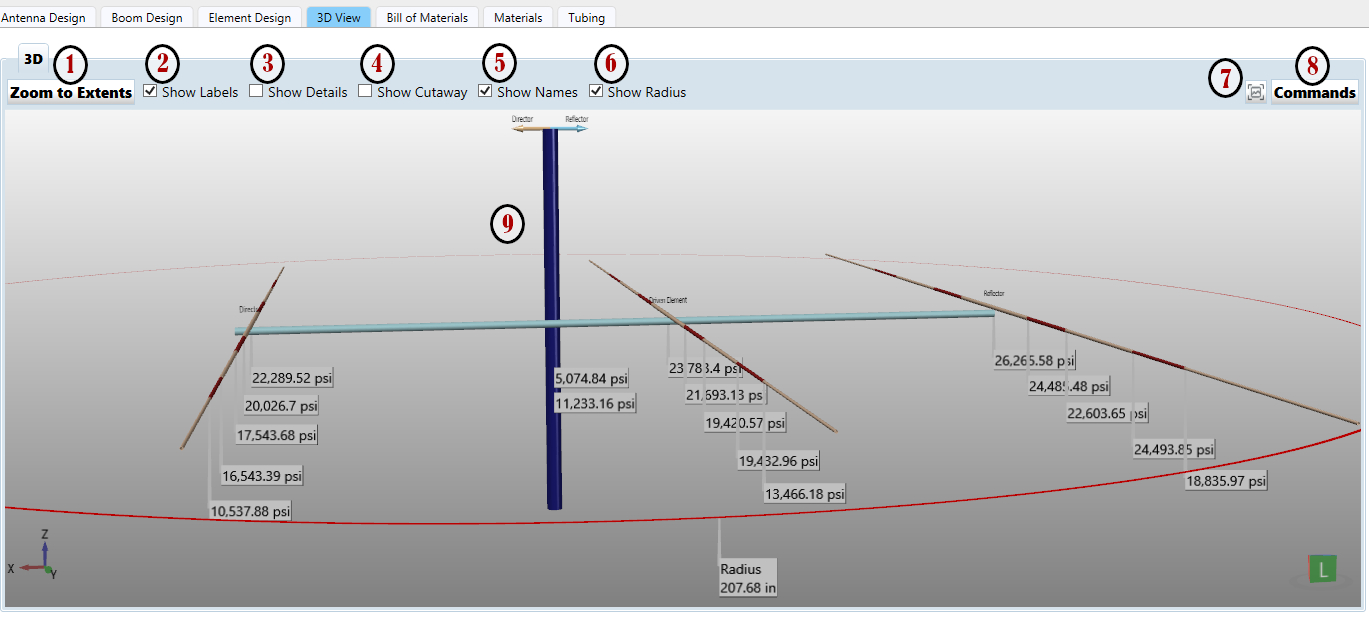
3D view – a three-dimensional display of your design’s elements and boom with estimated turning radius
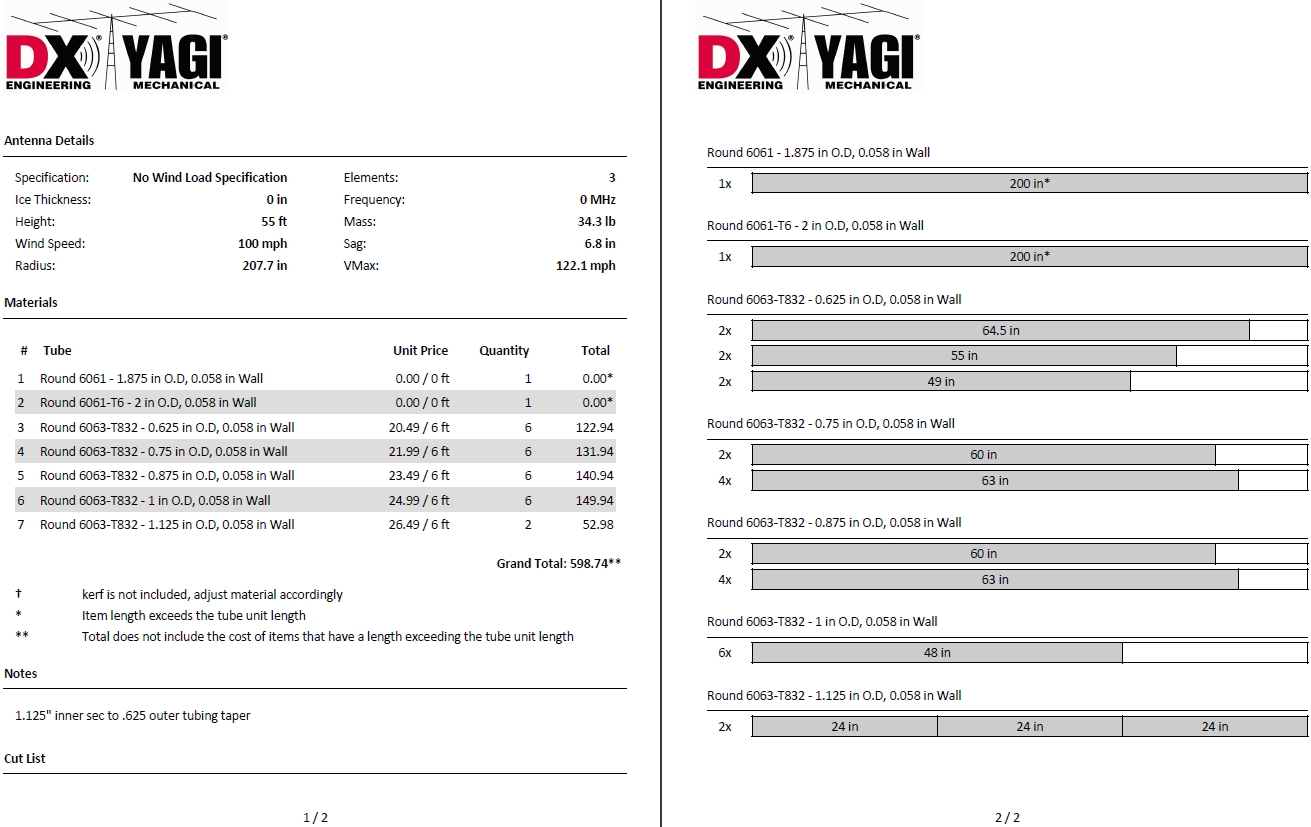
Tubing size and length Bill of Materials (BOM) table, with cost estimates enabled for web-linked parts and tubing sizes with user-defined prices – Can be printed or saved as a PDF
Files from previous versions of YM can be imported into the new version
YM files can be exported to specific Yagi electrical performance programs
Helpful notifications when attempting to enter values that would result in an unusable design
Yagi Mechanical® now makes use of Microsoft .NET, which is normally already installed in most Windows 10 and 11 operating systems. Yagi Mechanical® no longer uses Java.
This program is for the hobbyist or engineer who is interested in creating antennas that are strong, reliable, and crafted to specific needs. Utilize Yagi Mechanical® software to start brand new designs with robust mechanical properties or analyze your existing designs and instantly see where failure could occur. Test your elements for strength, balance, weight, and torque on the boom. Then use an electrical design program to refine the electrical performance and bring those refinements back to Yagi Mechanical® to verify the mechanical strength and survivability of the completed design. This superb tool can help find weak points in old designs and show where specific boom or element changes and reinforcements can provide long-lasting mechanical improvements.
Why build an antenna with great electrical performance, if the wind or ice accumulation is going to break the elements right after installation? Armed with the knowledge of accurate strength predictions, the sophisticated algorithms of Yagi Mechanical® makes designing robust antennas a joyful accomplishment. DX Engineering Yagi Mechanical® Antenna Design Software offers smart planning and design, along with the ultimate benefit of peace of mind that the finished antenna will stand the test of time.
3D Tab View
YM's New Design Method
If you have used YM before, you probably see some dramatic differences from what you are used to when designing new antennas or checking the mechanical stability of existing designs. The most significant part of this is because previous versions of our Yagi Mechanical® software used element pieces defined by cross-sectional material in order to calculate wind speed and ice loading survivability. While this provided useful results the process could be difficult depending on how your antenna was designed - usually for multiple wall designs - and what was determined by YM for the Element View and Bill of Materials was not always reliable in these cases.
With our new release of Yagi Mechanical® we have rebuilt all aspects of the program, including how we look at the tubing used to build your designs. The largest difference is that you no longer specify sections but rather sizes of tubing and where they physically reside in relation to the center of the element. This takes some adjustment if you are used to the old method, but the code behind the scenes produces mechanical data that is just as accurate while now allowing a more accurate report on the Bill of Materials and making our new 3D View possible.
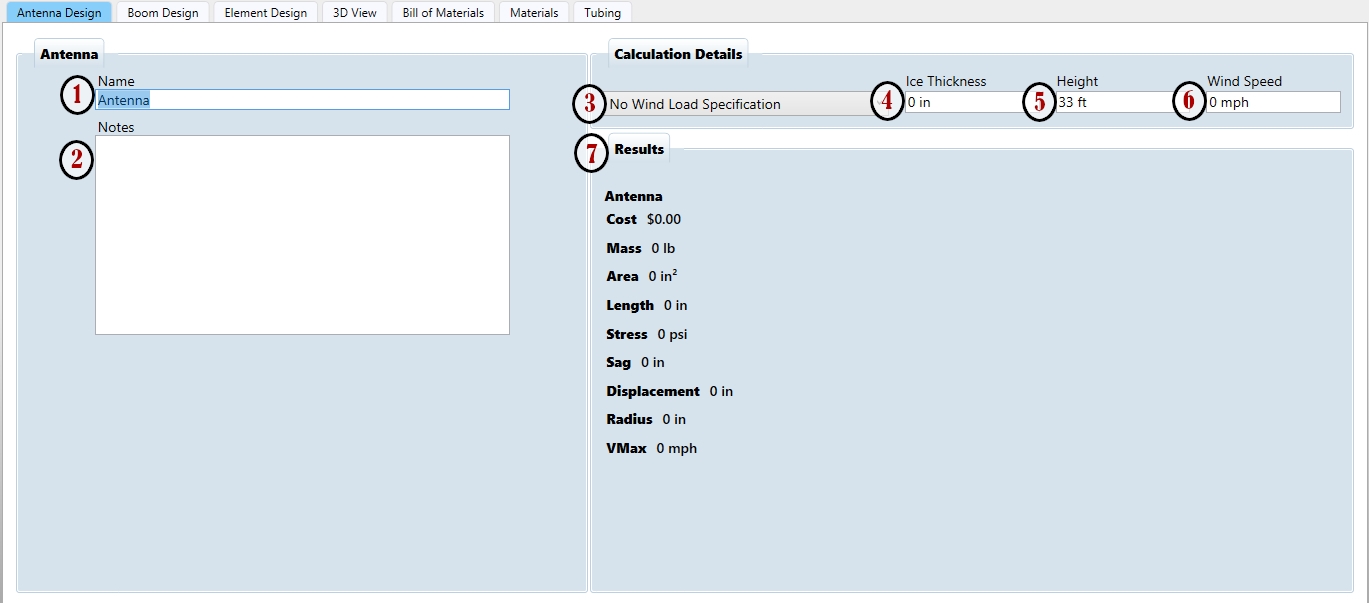
Antenna Design Tab
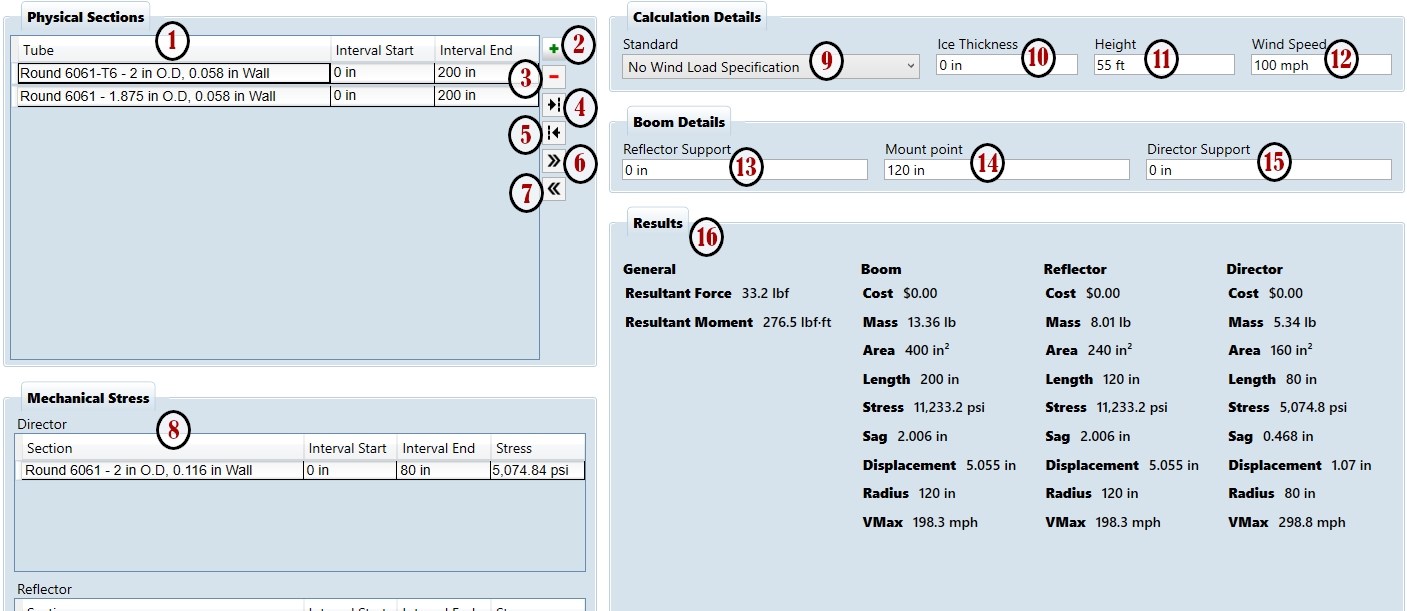
Boom Design Tab
Bill of Material Tab
Minimum Requirements:
Operating System: Microsoft Windows 10 or 11
Processor: 1 gigahertz (GHz) or faster with 2 or more cores on a compatible 64-bit processor or System on a Chip (SoC).
RAM: 4 gigabytes (GB).
Storage: 64 GB or larger storage device
Graphics card: Compatible with DirectX 12 or later with WDDM 2.0 driver.
Display: High definition (720p) display, 8 bits per color channel.
Note: The directory that YM uses to store User Data can be specified in the Options dialogue.
Based on Windows conventions, the recommended storage directory should be C:\Users\your username\Documents\Yagi Mechanical Files (the default directory used by YM ).
Or you can ignore Windows convention and create the directory C:\YM Files.
Yagi Mechanical® no longer requires Java and makes use of Microsoft .NET which is typically already in place for most Windows installations.
Specifications
Brand:
Manufacturer's Part Number:
DXE-YAGIMECH6
Part Type:
Product Line:
DXE Part Number:
DXE-YAGIMECH6
Application Software Type:
Yagi windload calculation
Software Format:
Web download
Computer Radio Interface Cable Included:
No
Quantity:
Sold individually.
Notes:
Complete instructions at yagimechanical.com
Computer Required:
IBM-compatible PC
Documentation
Loading...
Loading...
Reviews Write a Review
Some parts are not legal for use in California or other states with similar laws / regulations
Modal Header
Call To Order
This is a custom order part. You can order this part by Contacting Us.

Email this page