
Instruction Sheets for Part Number ATN-SAT-TRACKER
CSN Technologies S.A.T. - Self Contained Antenna Trackers SAT-TRACKER
Part Number: ATN-SAT-TRACKER
CSN Technologies S.A.T. - Self Contained Antenna Trackers
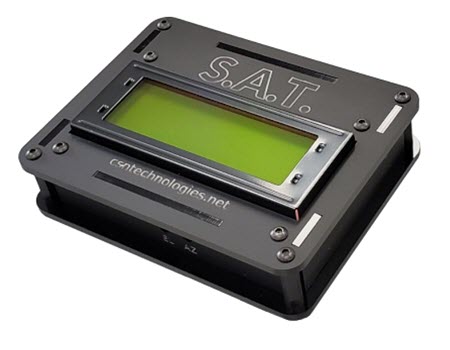
S.A.T. Self-Contained Antenna Tracker, Satellite Controller for Yaesu Az-El Rotator & ICOM Satellite Radios, USB, WiFi, GPS, Stand, Cables, Each
See More Specifications
Estimated Ship Date: Today Would you rather pick it up?
Overview
CSN Technologies S.A.T. - Self Contained Antenna Trackers
- The CSN Technologies S.A.T. works with any modern web browser on any device and eases the learning curve for satellite operations as there are no software, apps, or com ports to configure. Simply connect it to a rotator and a transceiver and all that is needed to control it is a web browser!
The built-in LCD displays information related to the current state of the S.A.T. For example, the IP address, serial number and firmware version are displayed when the S.A.T. is idle. When actively tracking, the satellite name, azimuth, elevation, range, range rate and AOS/LOS is displayed. Various status messages are displayed during the TLE and firmware update process. The Rig Control port on your S.A.T. is connected to your transceiver with the provided Tip-Ring-Sleeve cable. Refer to the images to find the CI-V or Remote jack on your transceiver.
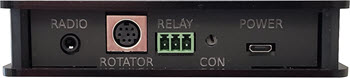
The S.A.T. dashboard is separated into logical areas called "Panels".
Refer to the user manual for a full detailed view of the dashboard.
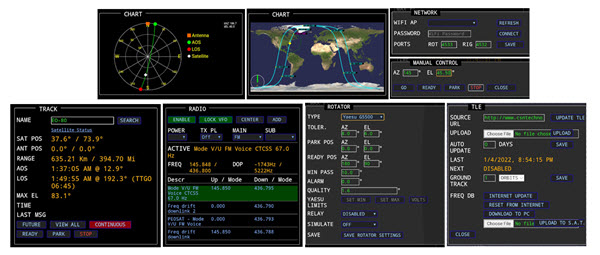
Track Panel - While tracking, this panel displays essential satellite information and current antenna position information. Current wind speed and direction are also displayed for your location.
Map & Charts Panel - This is a full-color map display. With this style of display, you can see the satellite's location above the Earth and its current track. In the lower left is a graphical display of the current antenna position.
Radio Panel - Displays radio controls and available satellite transponders.
Manual Control Panel - The control panel lets you manually point your antenna in a given direction.
TLE/FREQ DB Panel - The TLE Panel is where you set various TLE options.
Rotator Panel - The Rotator Panel is where you will find the rotator and satellite tracking settings.
Network Panel – Contains setting for connection to a local Wi-Fi connection.
Location Panel – Change operating location and other settings.
Note: Whenever the DX Engineering "Documentation" tab is available, please look at the associated files for additional product information.
Additional Features and Specifications:
Self-Contained
Built-In Wi-Fi
USB Powered
Web Interface
Easy Setup
All Cables Included
Display Stand - Included
Controls Yaesu G5400, G5500, G5600 Rotators
Supports PSTRotator–Software for Antenna Rotators
Icom Rig Control
Realtime Monitoring
Pass Prediction
Scheduled Tracking
Custom TLE List
Manual & Automatic TLE Updates
Configurable AOS alarm
NO/NC Relay Output
Manual Rotator Control
Sky Views
Transponder Updates
QSO Log w/ ADIF Export
Easy OTA Firmware Updates
Specifications
Brand:
Manufacturer's Part Number:
SAT-TRACKER
Part Type:
Product Line:
DXE Part Number:
ATN-SAT-TRACKER
RFI Filter:
No
Quantity:
Sold individually.
Documentation
Loading...
Loading...
Some parts are not legal for use in California or other states with similar laws / regulations
Modal Header
Call To Order
This is a custom order part. You can order this part by Contacting Us.

Email this page