
Technical Articles for Part Number DXE-Z10000K2-KIT
DX Engineering Clifton Laboratories Z10000 Buffer Amplifiers DXE-Z10000K2-KIT
Part Number: DXE-Z10000K2-KIT
DX Engineering Clifton Laboratories Z10000 Buffer Amplifiers
Clifton Labs Buffer Amplifier Kit for Elecraft K2, Built & Tested Z10000C PCB, Mounting Hardware, Insulation, Coaxial Cables w/Connectors, Kit
See More Specifications
Estimated Ship Date: Today Would you rather pick it up?
Overview
DX Engineering Clifton Laboratories Z10000K2-KIT Buffer Amplifier Kits
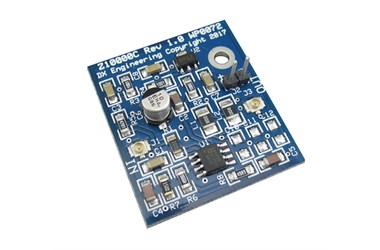
Here is our version of the very popular Clifton Laboratories Z10000 Buffer Amplifier circuit designed by Jack Smith, K8ZOA (SK), which is required when adding a Software Defined Radio (SDR) receiver and panadapter display capabilities to an older receiver or transceiver, or to a new radio that does not have a real-time high-speed spectrum scope. The Z10000 Buffer Amp's high input impedance can safely tap the early-stage broadband Intermediate Frequency (IF) signal from inside your radio and feed the buffered and amplified low impedance IF signal to your external SDR receiver. It can then produce a spectrum scope - waterfall display pattern of the receiver signals on a compatible tablet or monitor and PC that is running the appropriate third party SDR software.
The DXE-Z10000K2-KIT is the Buffer Amplifier Kit designed for those willing to do an internal modification, specifically tuned to the 4.915 MHz IF signal of the Elecraft K2 transceiver. As a buffer, this circuit provides over 90dB of reverse isolation to protect the IF stages of the radio from possible birdies that may appear on the SDR receiver input. This kit is the same as the Universal kit with the added benefit of a tuned IF input and a narrower bandwidth of operation for a potentially a lower noise floor on the output.
Clifton Laboratories Buffer Amp kits now contain the updated, completely assembled and tested DX Engineering Z10000C PC Board with a nominal 9 dB gain, retaining all the benefits of the reliable original Z10000B boards. Kits include our finished printed circuit board, required coaxial cables with special connectors, insulating materials and hardware, all for an easier installation than ever before!
Due to the high number of specialized radio installations, no printed instructions are included with these buffer kits. Legacy Elecraft K2 Buffer Amplifier Kit radio installation and operational instructions are found here under the Documentation tab. Videos or other instructions may be available from other sources. Additional information and specifications may be added.Here are the basic steps to this project:
- Adding a spectrum scope display to a Radio that does not have one requires an external SDR receiver and monitor.
- The SDR receiver requires the Intermediate Frequency (IF) signal to display the exact signals the Radio is tuning.
- The DX Engineering Clifton Laboratories Z10000 Buffer Amplifier adds an IF Output to the Radio that doesn't have one
- With an accessory coaxial cable, connect the new IF output on the Radio to the Antenna Input of the SDR and tune it to the Intermediate Frequency of the Radio to see what it hears.
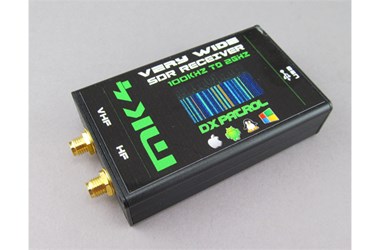
A third party SDR receiver, software that is often a free download and a compatible tablet or PC and monitor are required to make use of the IF signal provided by the Z10000 Buffer Amplifier and see the signals that your radio can only hear. For some, choosing and using your SDR can be a more challenging task than adding the Buffer Amp Kit in your radio. But the links here and elsewhere, even those that are dated, can help you get going.Available from DX Engineering is the amazingly small DXP-DX-PATROLMK4 SDR Receiver, a device that connects to a PC, Mac, Android Smartphone or Tablet with either the included micro-USB cable or an Android smart phone charger cable. For PC, many enjoy using HDSDR software with this unit, a free download from hdsdr.de. There are several other good SDR programs available on the Internet.
The DX-Patrol MK4 is one of dozens of SDR receivers available, some cost less than $50.00 and some are over $2,000.00. A model that is well under $200 is quite sufficient for display of the IF signal from your radio. The common complaint that inexpensive SDR receivers produce images or overload is when they are connected a large HF antenna. But, for this IF display application, your radio's band pass filtering will probably prevent those problems. Here is a link to an exhaustive blog page on SDR, that features a roundup of SDR’s— in 2014. There are new versions out since then, but this page has in-depth background info on SDR radios of all kinds.https://www.rtl-sdr.com/roundup-software-defined-radios/The processing power of the smart phone, tablet, Mac or PC computer and the quality of the display will affect SDR receive operations and display of your radio's IF signal. But, an SDR display receiver does not necessarily need to be as good as the main receiver. That is a topic for discussion among enthusiasts.
Buffer Amp and SOFTROCKHere are links to an SDR receiver kit called Soft Rock Lite II, for those who want to build an inexpensive SDR for this project.http://fivedash.com/index.php?mainpage=product_info&products_id=5http://www.wb5rvz.org/softrock_lite_ii/index/projectId=8http://fivedash.com/resource/softwareSetup.pdf
The legacy that was built by Jack Smith, K8ZOA (SK), with Clifton Laboratories, lives on with select products, exclusively from DX Engineering.
Specifications
Brand:
Manufacturer's Part Number:
DXE-Z10000K2-KIT
Part Type:
Product Line:
DXE Part Number:
DXE-Z10000K2-KIT
Receive Antenna System Device Type:
High-isolation, low-gain preamp
Receive Frequency Range:
4.000 MHz - 6.000 MHz
Preamplifier Gain:
9.0 dB
Third Order Intercept (IP3):
Over 30 dBm
Receive Feedline Connector Type:
None
Optimal Voltage Range:
11-18 VDC
Current Required:
40 mA
Quantity:
Sold as a kit.
Notes:
Installation instructions not included; available from web links only
Documentation
Loading...
Loading...
Some parts are not legal for use in California or other states with similar laws / regulations
Modal Header
Call To Order
This is a custom order part. You can order this part by Contacting Us.

Email this page